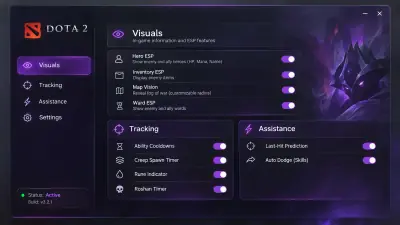
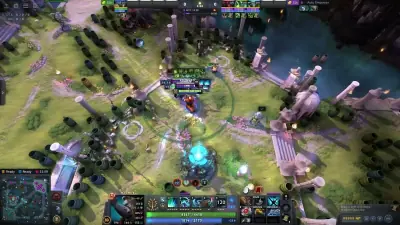
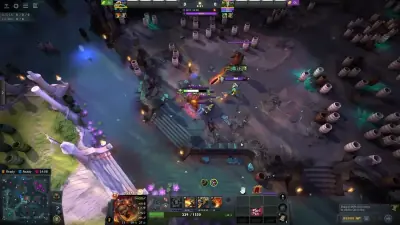
Hero ESP
Read the matchup.
Shows enemy heroes with their items and levels before you commit to a fight.
- Enemy heroes
- Item visibility
- Level visibility
Read enemy rotations, items and cooldowns. Track wards, runes and Roshan with Dota 2 cheats built around information. Cloud DMA is required for full functionality.

Hero ESP
Items and levels
Timing
Runes and Roshan
Windows
10 / 11
Cloud DMA
Required
Features
Vision, timing and combat assistance for the decisions that shape a Dota 2 match.
Read the matchup.
Shows enemy heroes with their items and levels before you commit to a fight.
Follow rotations.
Reveals hidden map activity so enemy approaches and jungle positions are easier to read.
Find a spell window.
Shows enemy ability cooldowns to help time an engagement while a key spell is unavailable.
Read enemy vision.
Reveals ward positions to inform dewarding and your next route through the map.
Plan for the pit.
Tracks Roshan timing so objective preparation starts before a team moves into the river.
Watch the next spawn.
Marks upcoming rune spawns so a lane decision can account for the next river opportunity.
Judge the final hit.
Predicts the damage threshold for a creep last hit while you decide when to attack.
Movement assistance.
Automatically moves your hero away from incoming skillshots; exact coverage is not documented.
Keep lane timing visible.
Shows creep timing to support wave planning without counting every arrival yourself.
Store
Compare the Dota 2 package, required Cloud DMA and separate utilities.
Explore the complete feature list and the Windows setup it depends on.
Hero ESP, fog removal, cooldown tracking, wards, timers, last hit prediction and auto dodge.
Separate utility; confirm Dota 2 coverage before purchase.
The utility works on disk serials, MAC addresses, GPU identifiers and related fingerprints. Trace cleanup is included. These functions concern the PC profile, not restoration of a sanctioned account.
Cloud DMA is required for full functionality and is purchased separately. It prepares a Hyper V environment on your own Windows PC. Confirm the complete infrastructure order before checkout.
Cloud DMA provisions Hyper V on your gaming PC and activates the service over an encrypted connection. The setup uses one physical PC, with no USB DMA bridge or PCIe DMA card. It is infrastructure, not an additional Dota 2 feature module.
Separate utility; confirm Dota 2 coverage before purchase.
Skin Changer displays weapon finishes, outfits and knife styles in supported games. The utility provides a local visual library rather than an inventory purchase for every cosmetic.
Why us
Compare the listed capabilities. Other providers vary; these rows describe this product without assuming what another shop includes.
Hero and inventory information
Hero ESP shows items and levels so a pickoff decision accounts for the target’s build.
Map and ward visibility
Fog removal and ward ESP cover hidden movement and the vision that protects it.
Cooldown and objective timing
Ability cooldowns, creep and rune indicators, and a Roshan timer keep timing information visible.
Last hit and dodge assistance
Prediction helps judge creep last hits. Auto dodge provides movement assistance against skillshots.
Explicit Windows requirements
Windows 10 or 11 with HVCI, Core Isolation, TPM and Secure Boot enabled is required.
Cloud DMA delivery layer
Full functionality requires the separate Cloud DMA environment on your Windows PC.
Vision
Map information
Enemy heroes, items, levels and ward positions.
Timing
Fight and objective windows
Cooldowns plus creep, rune and Roshan timing.
Setup
Check before purchase
Confirm Windows and the full Cloud DMA dependency list.
Setup guide
Check the Windows conditions and the separate Cloud DMA setup before ordering. Delivery format and current compatibility should be confirmed through support.
Check Windows and security
Confirm the Cloud DMA setup
Follow current delivery instructions
How it works
Understand the product and its delivery layer before you place an order.
4 easy steps
Check your configuration
Confirm Windows, security settings and Hyper V availability on your own PC.
Review the feature list
Separate vision and timing modules from last hit and movement assistance.
Confirm separate purchases
Cloud DMA is required. Ask which further infrastructure products your Dota 2 setup needs.
Use current instructions
Review the external checkout terms and follow the delivery instructions supplied with the order.
Blog
Dota 2 guides
Understand fog removal, hero ESP and ward visibility, including what the Dota 2 package documents and which controls remain unconfirmed.
See how enemy cooldowns, items and levels provide different information for a gank or team fight, with clear limits on the documented assistance.
Understand the different jobs of Roshan, rune and creep timers without relying on fixed spawn values that may change with game updates.
FAQ
Answers for this page. The FAQ page holds the rest.