
Dota 2 Fog of War and Hero ESP: What Each Reveals
Understand fog removal, hero ESP and ward visibility, including what the Dota 2 package documents and which controls remain unconfirmed.
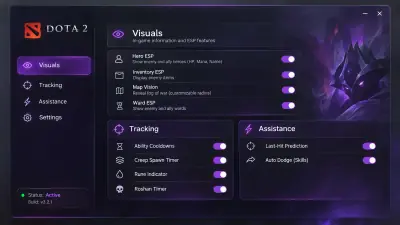
Dota 2 map information comes in several forms. Seeing an enemy hero, knowing its items and understanding which approaches are warded answer different questions. This package lists fog of war removal, hero ESP, inventory ESP and ward ESP separately. Reading those features as one vague “wallhack” loses the distinctions a buyer needs. This guide separates the visibility tools and explains their match context without assuming a menu or settings that have not been published.
Fog removal covers the map picture
Fog of war hides activity outside your team’s vision. The advertised map hack removes that hidden layer so rotations, jungle positioning and approach angles become visible. That is the main visibility claim. It describes access to information; it does not document an automatic route planner, a gank warning system or a tool that chooses an objective for you. Those would be additional features and should not be inferred from the words “full map hack.”
Imagine deciding whether to cross a river entrance while enemies are missing from their lanes. A broader map picture changes the information available for that decision. It does not change your hero’s mobility, the terrain or your teammates’ positions. Treat the example as an explanation of the advertised feature, not a measured result or a guarantee that every approach becomes safe.
Hero ESP adds identity and progression
Hero ESP shows enemy heroes and attaches item and level information. Position answers where a target is. Level and inventory help answer what meeting that target might involve. An opponent with an escape item presents a different situation from the same hero before that purchase. The feature list supports enemy information, but does not establish ally filters, distance limits, colour customization or health readouts.
Ward visibility is its own feature
Ward placement ESP reveals ward positions. It gives context to the enemy team’s vision and can inform dewarding or a route choice. Revealing a ward is different from destroying it. Automatic attacks on wards, automatic placement and a complete vision radius display are not documented. If one of those functions matters to your purchase, ask about it explicitly instead of treating it as part of ward ESP.
What the documentation does not settle
There is no verified menu map. The separate feature labels do not prove a particular toggle layout, shortcut key, refresh rate or overlay range. They also do not establish how every source of hidden information behaves on every Dota 2 build. Request confirmation for the current build and any specific interaction you depend on. A screenshot from another game cannot establish those details.
Where to go next
The Dota 2 feature page brings the documented modules together with the supported Windows conditions. Read the cooldown and inventory guide for the fight context that position alone cannot supply. Full functionality requires Cloud DMA; check the Cloud DMA setup guide before ordering. There is no published guarantee against detection, account penalties or a later compatibility change.