
Dota 2 Cheats for Map Awareness
Follow enemy heroes through the fog of war, read items and cooldowns, and keep objective timing visible. Cloud DMA is required for full functionality on supported Windows builds.
Product Overview
At a glance
Key capabilities
The short list for Dota 2 Cheats, before the full module list.
Another 5 options are in the full list below.
Overview
Map information for Dota 2 decisions
Documented features, setup conditions and product limitations.
See enemy heroes with items and levels, follow movement through fog of war, and locate wards. Cooldown tracking adds the spell context for deciding when to engage.
Creep, rune and Roshan timing support lane and objective planning. Last hit prediction and auto dodge add assistance beyond visibility. Windows security settings and the separate Cloud DMA layer are required.
Dota 2 Cheats brings map information and timing into the same package. Hero ESP reveals enemy heroes with items and levels, while fog removal makes hidden rotations and jungle positioning visible. The purpose is to inform a decision before your hero enters a fight.
Vision: heroes, wards and inventories
A hero’s position tells only part of the story. Item and level visibility adds the context for a gank: what the target has bought and how its progression compares with yours. Enemy inventory ESP supports that same read when deciding whether an opponent can escape or survive an approach.
Ward placement ESP reveals ward locations. Use that information to assess which approaches are exposed and where vision is being contested. The feature is visibility assistance; automatic ward removal or placement is not documented.
Cooldowns and fight timing
The ability cooldown tracker displays enemy spell cooldowns. If a key spell is unavailable, that creates a different engagement window from a fully available spell set. The tracker supplies timing information; it does not document automatic spell casting or complete combat routines.
Roshan, runes and creep timing
The Roshan timer keeps objective timing visible when planning around the pit. Rune spawn indicators support river decisions, and creep timers help keep track of the next lane timing. These are separate information tools: a timer does not establish that an approach is safe or that your team can contest an objective.
Last hits and movement assistance
Last hit prediction estimates the damage threshold for a creep’s final hit. It supports the attack decision rather than promising automatic farming. Auto dodge is different: it automatically moves the hero away from incoming skillshots. Its exact spell coverage, priority rules and tuning controls are not published.
Controls and performance scope
Features are listed as separate modules, but a verified menu map is unavailable. Hotkeys, colour options, distance filters, profiles and dodge sliders are not specified here. Performance optimization is advertised qualitatively; no frame rate, latency or hardware benchmark supports a numeric promise.
Required Windows configuration
Windows 10 or Windows 11 is required with HVCI, Core Isolation, TPM and Secure Boot enabled. These are supported configuration conditions. The fact that Dota 2 itself runs on a machine does not establish that this software package supports the same configuration. macOS and Linux are not documented.
Cloud DMA is a separate requirement
Full functionality depends on Cloud DMA. This separately purchased layer provisions a Hyper V environment on the same Windows PC and activates through an encrypted service connection. It does not require a second physical PC, USB DMA bridge or PCIe DMA card. Review CPU virtualization, Hyper V availability, memory and connection requirements on the Cloud DMA page.
Cloud DMA lists GREENWARD, Static Server and AWS as three separate purchases. Static Server and AWS are different products. Whether every Dota 2 configuration needs all three is not confirmed in the Dota 2 description. Ask support for the complete order list before paying.
What is separate and what is unconfirmed
HWID Spoofer and Skin Changer are separate catalogue products. Neither is listed as included or required for Dota 2. Dota 2 cosmetic coverage is unconfirmed. Aimbot and recoil language conflicts with the documented feature list, so this site does not advertise those capabilities.
Before checkout
Confirm current build compatibility, delivery format, license conditions and the infrastructure purchases needed for your setup. The purchase button opens external checkout, where current options and terms are shown. Patch turnaround, lifetime compatibility and protection against account penalties are not guaranteed.
Modules
What's included
The documented feature list for Dota 2 Cheats. Confirm specific controls before purchase.
- Hero ESP with items and levels
- Fog of war removal
- Ability cooldown tracker
- Creep spawn timers
- Rune spawn indicators
- Last hit prediction helper
- Auto dodge skillshots
- Ward placement ESP
- Roshan timer
- Enemy inventory ESP
- Performance focused design; no published benchmarks
Experience
Feature scope and purchase preparation
Hero ESP shows enemy heroes with items and levels. Fog removal supplies the wider map picture, while ward ESP makes vision positions visible. Use these different views to assess a route, a gank or a contested area.
Reference artwork
- Layer A
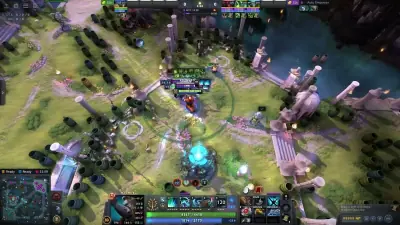
Hero information near the river
Supplied gameplay capture with overlapping hero readouts and the Magnus HUD.
- Layer B
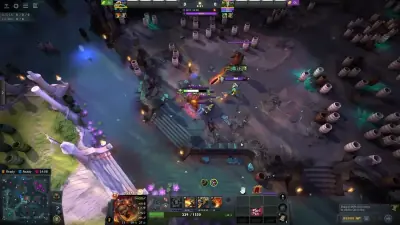
Lane skirmish
Supplied gameplay capture showing Huskar and nearby units beside the river.
- Layer C
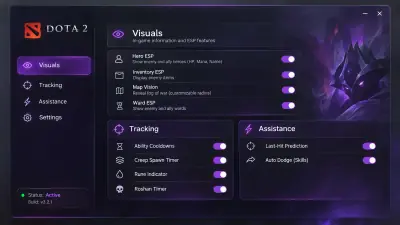
Illustrative dashboard mockup
Concept artwork, not an authenticated software screenshot. Displayed controls, status and build are illustrative.
More products
Pairs well with
Utilities sold beside the cheat. Each one keeps a separate page.
- HWID Spoofer The utility works on disk serials, MAC addresses, GPU identifiers and related fingerprints. Trace cleanup is included. These functions concern the PC profile, not restoration of a sanctioned account. View details: HWID Spoofer
- Cloud DMA Cloud DMA provisions Hyper V on your gaming PC and activates the service over an encrypted connection. The setup uses one physical PC, with no USB DMA bridge or PCIe DMA card. It is infrastructure, not an additional Dota 2 feature module. View details: Cloud DMA
- Skin Changer Skin Changer displays weapon finishes, outfits and knife styles in supported games. The utility provides a local visual library rather than an inventory purchase for every cosmetic. View details: Skin Changer
FAQ
Questions about this page
Answers for this page. The FAQ page holds the rest.
Blog
Related guides
Documented features
Understand fog removal, hero ESP and ward visibility, including what the Dota 2 package documents and which controls remain unconfirmed.
See how enemy cooldowns, items and levels provide different information for a gank or team fight, with clear limits on the documented assistance.
Understand the different jobs of Roshan, rune and creep timers without relying on fixed spawn values that may change with game updates.
Separate last hit damage prediction from automatic movement against skillshots, and learn which settings and coverage are not documented.
A concrete pre purchase checklist covering documented features, Windows security, Cloud DMA dependencies, delivery and separate utility compatibility.