
Before You Buy Dota 2 Cheats: A Feature and Setup Checklist
A concrete pre purchase checklist covering documented features, Windows security, Cloud DMA dependencies, delivery and separate utility compatibility.
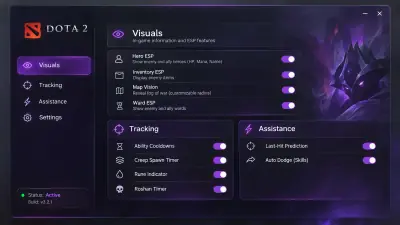
A useful Dota 2 cheat purchase starts with the feature you want and the setup it needs. This package focuses on map information and timing, with last hit prediction and auto dodge alongside the visibility tools. It also requires a separate Cloud DMA environment. This checklist helps you compare the documented scope with your expectations and resolve the missing details before reaching external checkout. It does not promise match results, current detection status or guaranteed access after updates.
Match your expectations to the actual feature list
The list includes hero ESP with items and levels, fog removal, cooldown tracking, creep and rune timing, a Roshan timer, ward and inventory ESP, last hit prediction and auto dodge. Look for the particular function you care about. An aimbot, recoil controls, automatic farming, stream hiding and detailed menu settings are not established by that list. If an unlisted capability is essential, ask for documentation before treating the product as a match.
Check the PC you will actually use
The main package requires Windows 10 or Windows 11 with HVCI, Core Isolation, TPM and Secure Boot enabled. Cloud DMA adds CPU virtualization, Hyper V availability, memory and connection conditions. Use the Windows checklist to collect your configuration. A game running successfully is not proof that this separate software environment meets its supported conditions.
Confirm the full dependency order
Cloud DMA is required for full functionality and is a separate product. Its own listing also names GREENWARD, Static Server and AWS as separate purchases. The Dota 2 page does not settle whether all three apply to every buyer. Request a complete order list for your configuration, including whether existing access can be used. Read the dependency explanation rather than assuming everything is included.
Ask about delivery and updates
The brief does not confirm whether access arrives as a loader, key or account bound entitlement. It also does not publish update turnaround, reset allowances or license transfer rules. Ask support to confirm delivery format, the current compatible Dota 2 build and where future compatibility information is provided. Do not treat a general performance claim as a benchmark or a current availability indicator.
Keep catalogue utilities in their own scope
HWID Spoofer and Skin Changer are separate products. Neither is listed as included or required for the Dota 2 package. Dota 2 coverage for those utilities must be confirmed. The HWID scope guide explains identifier changes and account limits; the Skin Changer guide explains local previews and inventory ownership. Do not add a utility to an order simply because it appears beside the main product.
Take the confirmed details to checkout
Open the Dota 2 product page when the feature scope, machine requirements and dependency list are clear. The purchase button takes you to external checkout for current options and terms. Keep the order reference for support and follow the supplied installation instructions. Unanswered compatibility or delivery questions belong with support before payment; the FAQ provides the concise version of the documented requirements.